A computer for you and your AI agents
The self-expanding OS
for you and your agents.
Describe an app you need and AI builds it on your own private cloud computer. Use it, improve it, and keep your apps, files and agents in one place.
3-day trial · Card required · Cancel before renewal
macOS, Windows and Linux · Use the arrow to choose another version
Works with the agents you already use
 Claude Code
 Codex
Codex Pi
Pi OpenCode
 Cursor
 Gemini CLI
The story · 01/04
Describe an app
matrix@main-computer:~/apps/habit-tracker
$ claude ‘build a habit tracker with a weekly view’
● Creating habit-tracker…
✓ Weekly check-ins
✓ Add and edit habits
✓ App preview ready
Try: help, ls, pwd, clear, or open habit-tracker

What would you like to make?
An app, a plan, a little less busywork.
Build your own apps.
Describe a tracker, planner, or dashboard and make it part of your workspace.
Work with AI agents.
Give them tasks with your files, apps, and tools in the same place.
Bring your preferred AI.
Use supported agents with your own provider accounts. AI subscriptions and usage are billed separately by your provider.
Access your workspace anywhere.
Open the same cloud computer through the desktop app, browser, or terminal.
Make it yours
Start with an app you need.
A tracker, a planner, a dashboard. Start with a simple idea and shape it around your work.
Build your own habit tracker
A small app for the habits you want to keep, built around your routine.
Use this recipeCopy the brief, add your inputs, and run it with your agent. These previews use illustrative data.
Explore all recipesYour task
Build me a habit tracker with a weekly view. Let me add habits and check them off each day.
Here’s an example of your first app: a weekly habit tracker. Try its check-ins in the hero demo, then build your own version in Matrix.
Your review step
Try the check-ins, reload the app to check saved progress, and ask for changes.
Describe it. Build it. Use it.
Download and open Matrix Desktop, create your account, and start your trial. A secure browser window handles account, plan, and Checkout, then returns you to Desktop.
Describe the app you need.
A habit tracker, a client dashboard, a content planner. Say what it should do in plain words.
Build it with your agent.
Your agent works on the app on your private Matrix computer. Review what it builds and answer questions as it goes.
Use it and improve it.
Open the app in your workspace, then ask for changes whenever you want. Your OS grows with every app you add.
Compute · Integrations · Inference
A computer for you and your AI agents. Everything you need to make it useful.
A self-expanding OS grows with your work. Start with Chat, Terminal and your connected tools. Describe the apps you need, then add them to the computer you use every day.
A real computer for the work.
Build apps, run agents in a terminal, and keep your files and database in one private cloud workspace. Open the desktop yourself whenever you want.
Explore Matrix DesktopBring your tools into the work.
Connect supported services such as GitHub, Google Drive, Gmail, Calendar and Slack. Give your agent the context and actions the task needs, with your permission.
Explore integrationsChoose the AI for the job.
Chat and work through supported agents including Claude Code, Codex, Gemini CLI and Pi. Bring your own provider accounts, subscriptions or API keys through supported login flows.
See supported agentsAn example workspace
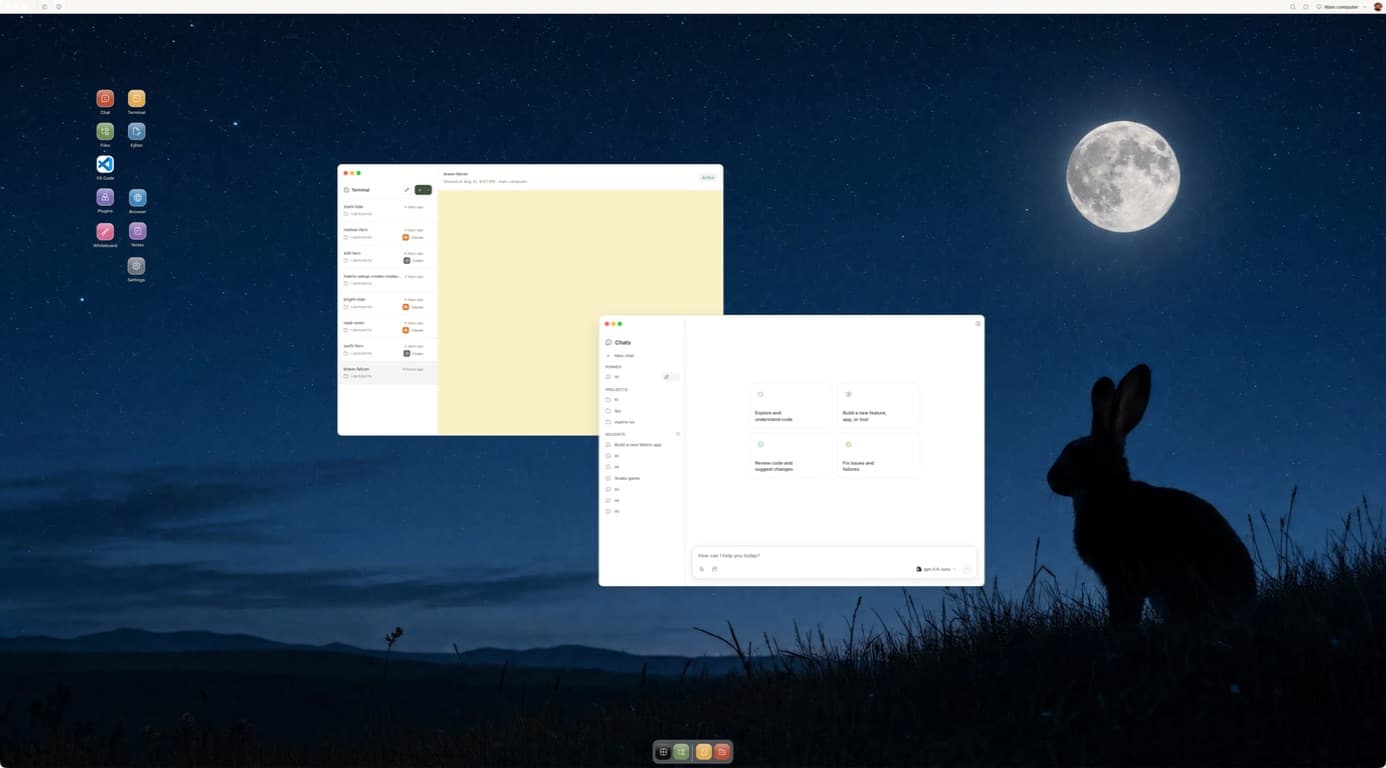
Your Matrix computer
Apps, agents and files share the same workspace.
Build an app. Use it. Keep improving it.
Always-on and scheduled work require Builder or Max. Starter sleeps when inactive.
Matrix AI Gateway
We’re building our own AI gateway for Matrix. Join the waiting list for early access and product updates.
Explore the AI gateway waitlistWhy your own computer? A place for everything you build.
A computer that keeps your work together
Your apps, files, services, and agents share one cloud workspace. Keep building on what is already there.
Explore the workspaceRoom for work in the background
Builder and Max keep agents working after your laptop closes, with parallel sessions for different jobs. Starter sleeps when inactive.
Compare the plansYour own workspace. Open source.
Your files and database live on an isolated Matrix computer. The runtime is open source, with a manual self-hosting path for builders.
Explore the sourceTake your work with you
Your workspace.
On the screen that suits you.
Your files and projects stay in Matrix. Pick up from the screen that suits the moment.
Web app
Open an existing workspace in the browser. Work with apps, files, terminals, and agents.
Sign in on webDesktop app
The same cloud workspace, in a dedicated app for macOS, Windows, or Linux.
Explore desktop appNative mobile apps are in early access. Public store links are coming soon.
Always-on work requires Builder or Max. Starter sleeps when inactive.
Pick the computer that fits the work. Simple monthly plans.
Building your first apps with one agent? Starter. Want agents working while you’re away? Builder. AI subscriptions and usage are billed separately by your provider.
Starter
Flexible access for focused work
$20/month
- One agent/task at a time
- Automatically sleeps when inactive
- Limited active compute hours
- Automatic region
- Standard startup queue
- Limited storage and snapshot history
- No scheduled or always-running agents
3-day trial · Card required · Cancel before renewal
Builder
Your first dedicated, always-on computer
$100/month
- Always running
- Three parallel agents
- Scheduled/background tasks
- Region selection
- More storage
- Seven-day snapshots
- Faster startup and priority capacity
3-day trial · Card required · Cancel before renewal
Max
Maximum capacity for demanding work
$200/month
- Six to eight parallel agents
- Maximum compute
- Multiple workspaces
- Thirty-day snapshots
- Static IP/custom images
- Priority support and capacity
3-day trial · Card required · Cancel before renewal
Enterprise
For teams with custom requirements
Custom
Custom compute, rollout planning, and support for your organization.
Security and deployment review
Custom capacity and support
A rollout shaped around your team
One Matrix computer per plan.
Each additional computer repeats the same plan and Checkout flow.
3-day trial · Card required · Cancel before renewal
Questions, answered.
What can I do with Matrix?
Describe an app, build it with your agent, and use it in your workspace. Keep trackers, planners, dashboards, files, and tools together on your private cloud computer. You can also work on research, reports, and code with supported agents.
What are Matrix recipes?
Reusable task briefs with the inputs, instructions, expected result, and review boundaries for a job. Start by copying a recipe into your agent and supplying the requested inputs. One-click installation in the web app and desktop app is planned.
Will my agents work when I close my laptop?
Builder and Max provide always-on computers for scheduled and background work. Starter sleeps when inactive and does not include scheduled or always-running agents. Agent usage limits and connected service availability still apply.
Which agents can I use?
Bring Claude Code, Codex, Cursor, OpenCode, Pi, Gemini CLI, and terminal agents. Matrix also hosts Matrix-native agents like Hermes and OpenClaw-style assistants for workflows and connected tools.
Is my AI subscription included?
Your Matrix plan pays for the cloud computer. Your AI subscription or API usage is separate and stays with its provider. Sign in through the supported agent’s own login flow. Available models and subscription access depend on the agent, provider, and plan you use.
Is Matrix open source?
Yes. The Matrix runtime is available on GitHub under AGPL-3.0-or-later. Matrix Cloud manages the computer for you. A manual self-hosting path is available for builders who want to operate their own server.
Do I need a powerful laptop?
The work runs on your Matrix cloud computer. Use Matrix Desktop on a supported Mac, Windows, or Linux computer to get started. You can also access an existing workspace through its browser interface or the Matrix CLI.
What happens after I download?
Install and open Matrix Desktop, then create an account or sign in. Choose a computer plan and complete Checkout in a secure browser window. Once your computer is ready, return to Desktop, connect your preferred agent, and describe your first app.
What happens to my data?
Your files live in your Matrix home and workspace data lives in your Matrix database. Matrix is built around owner-controlled data, exportability, and isolated hosted computers.
What does it cost?
Hosted plans are $20/month for Starter, $100/month for Builder, and $200/month for Max. Your first primary Matrix computer can start with a 3-day free trial. A card is required, you pay $0 today, and Stripe automatically charges the selected monthly price when the 3-day trial ends unless you cancel first. The offer is once per Matrix account; additional computers bill immediately. Enterprises can contact us for a custom plan.
For builders: agents, terminals, and your own server
Already use Claude Code or Codex? Connect from your terminal, explore background agents, or run Matrix on your own server.
Install once. Then ask your agent naturally.
Matrix publishes three focused skills for setup, observable cloud work, and safe GitHub projects. Install them for your coding agents with one Matrix-owned command.
curl -fsSL https://matrix-os.com/install/skills | shCopy for your agent
Help me set up Matrix OS, my own cloud dev computer.

Steps:
1. Install the CLI: npm install -g @finnaai/matrix or brew install finnaai/tap/matrix.
2. Run matrix login --profile cloud. It opens a browser/device login that I will approve.
3. If no Matrix instance exists, tell me to sign up at https://app.matrix-os.com, then re-run login.
4. Verify with matrix doctor and matrix whoami.
5. Start my preferred coding agent inside Matrix with matrix run -it --session setup -- claude or matrix run -it --session setup -- codex. I will complete that tool's own login inside the remote terminal.

Do not scan my local machine for credentials or upload secret files. Everything authenticates through its own browser/device flow.
The next chapter of the web
Web 4.Your digital life.
One living system.
Our vision is a web where your computer, apps, agents, identity and conversations work as one connected environment.
Matrix OS is where it starts: your own computer, the tools and AI you choose, and software that grows around what you need.
The Web 4 vision
 Matrix OS
Built on compute, integrations and inference.
A foundation for the web we want to use.
Web 4 is our long-term vision. Build with Matrix OS today.
What will you build first?
A tracker for your routine. A planner for your next project. A dashboard that works your way. Start with an app you wish you had.
3-day trial · Card required · Cancel before renewal
By using Matrix OS, you agree to the Terms and acknowledge the Privacy Policy.